
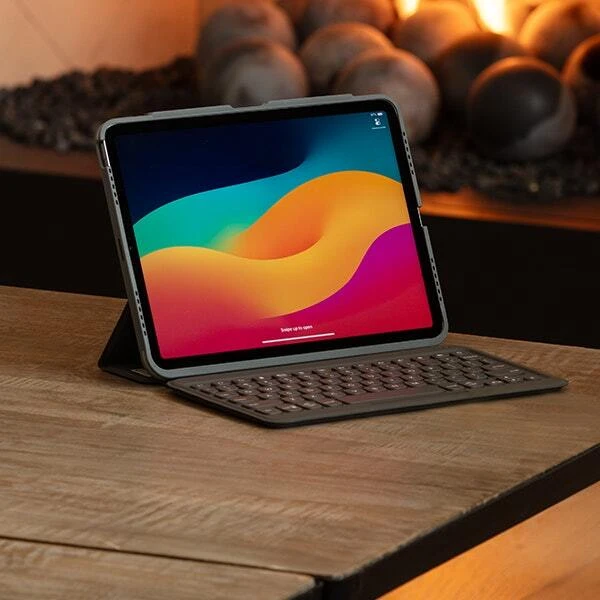
Tablets are brilliant for getting things done, right up until you need to type. Typing a quick message is fine on the touchscreen, but writing a report, clearing your inbox or taking a page of lecture notes is a different story. That's where a good tablet keyboard earns its place. Pick the right one and your tablet starts to feel like a laptop without the extra weight.
Choosing can be tricky, though, because the keyboard that suits a student isn't the one a frequent flyer or hybrid worker needs. ZAGG has pulled together what matters most, so you can find the right fit for how you work, study and travel.
What features to look for in a tablet keyboard?
Few features make most of the difference day to day.
- Spacious, laptop-style keys with a little travel feel solid under your fingers, while flat, cramped keys cause typos and slow you down.
- Bluetooth pairs with almost anything across iPad, Android and Windows, though you'll recharge it now and then. USB-C connects directly for a stable link with nothing separate to charge, while some cases use the tablet's own connector, which is simple but only fits certain models.
- A trackpad brings your tablet much closer to a laptop, worth it if you live in documents and spreadsheets. If you mostly write and browse, skipping it saves weight.
- Backlit keys are handy for dim meeting rooms and early flights, so you're not hunting for letters in low light.
- Long battery life means less time spent thinking about charging. The best keyboards last months between charges, so pick one you won't have to think about.
- Lighter is better if you carry it everywhere, and a case that adds drop protection earns its place in your bag.
- Check compatibility before buying. Most keyboard cases fit a single tablet model, so confirm it matches your exact device and generation.
A few extras are worth looking for: backlit keys for dim rooms, long battery life (the best last months), lightweight design, and a case with drop protection. Since most cases are built for one tablet, check that it fits your exact model first. ZAGG covers these in different ways. The Messenger Folio 2 stays slim and light with up to a year of battery, while the Pro Keys Connect adds a trackpad and backlit keys for something closer to a laptop.
Best tablet keyboard for remote work, travel and everyday productivity
For remote work and travel, the ZAGG Messenger Folio 2 is the best all-rounder: it's the one keyboard that also protects your tablet on the move. You get laptop-style keys, up to a year of battery, and a case that shields your iPad in your bag, all in a slim, standing design that fits a train table or airplane tray. Prefer a bare foldable keyboard? Those pack down smaller, but you lose the built-in protection.
A detachable keyboard case is usually the sweet spot: laptop-style keys and a stand when you're working, and you can pop the keyboard off when you only want to read or watch.
Here's how the ZAGG options compare across iPad, iPad Air and iPad mini:
- Best all-rounder - Messenger Folio 2 is slim and light for iPad and iPad Air, with laptop-style keys, USB-C charging and up to a year on a charge. Get this if you want simple, reliable typing you can forget about.
- Best laptop replacement - Pro Keys Connect for iPad Air and iPad Pro adds a trackpad and backlit keys, connects over USB-C with no pairing, and gives you up to 6ft of drop protection. Pick this if you're in documents and spreadsheets all day.
- Best compact setup - Slim Book is an ultra-slim, backlit keyboard for iPad mini that slips into any bag.
- Best for switching devices - if you move between an iPad, phone and computer, choose a keyboard with multi-device pairing so you're not reconnecting each time.
Best iPad keyboard case for travel, meetings and hybrid working
For hybrid working, the ZAGG Pro Keys Connect is the best iPad keyboard case for most people. The trackpad and backlit keys let your iPad stand in for a laptop in meetings, and up to 6ft of drop protection keeps it safe on the commute. If you're travelling more than you're sitting in meetings, the Messenger Folio 2 is the better fit.
From there it comes down to your day:
- Best for meetings and hybrid work - Pro Keys Connect has a trackpad, backlit keys and a USB-C direct connection, so there's no pairing and nothing extra to charge. The closest an iPad gets to a laptop.
- Best for travel - Messenger Folio 2 is slim and light with up to a year of battery. It stands the iPad upright without extra desk space and looks smart in a boardroom or a lounge.
- Best for packing light - Slim Book is an ultra-slim, lightweight, backlit keyboard for iPad mini that slips into any bag.
Whatever you pick, match it to your exact iPad, from 12.9 and 13 inch down to 8.3 inch iPad mini . Still weighing them up? We compare the best iPad keyboard cases for travel, meetings and hybrid working in more detail.
Best Samsung Galaxy Tab keyboard for work, study and portability
Galaxy Tab users have a little more to weigh up. Your keyboard needs to work well with Android, and ideally with Samsung DeX, which gives you a desktop-style layout on the tablet, so compatibility and a comfortable layout come first.
A universal Bluetooth keyboard is a flexible pick. It connects to Galaxy Tab models across generations, and usually to your phone and laptop too, which suits students and hybrid workers with more than one device on the go. For long essays and study sessions, go for full-size, laptop-style keys and a proper function row rather than a cramped folio. If you use DeX often, shortcut and function keys make it quicker to move around.
ZAGG's universal Bluetooth keyboards work across Apple, Android and Windows, so they're a safe choice if you want one keyboard for everything. You can also check the Galaxy Tab S10 FE, S9 and S9 FE range for accessories made for your device and confirm compatibility with your model before buying.
Which Tablet keyboard suits you?
- One light keyboard for everything: a slim, detachable case with a stand, like the Messenger Folio 2.
- The closest thing to a laptop: a case with a trackpad and backlit keys, like the Pro Keys Connect.
- Travelling as light as possible: a Slim Book for iPad mini.
- Juggling several devices: a Bluetooth keyboard with multi-device pairing.
Still deciding? ZAGG's Which keyboard is best for me? tool narrows it down by device and how you work. You can also browse the full range of tablet keyboards to find your match, or head to the ZAGG blog for more tips.
Frequently asked questions
1. Do tablet keyboards work with any tablet?
Not always. Most keyboard cases are made for a specific tablet model and generation, so check the fit first. Universal Bluetooth keyboards are the exception and connect to nearly any tablet, phone or computer.
2. Is Bluetooth or USB-C better?
Both work well. Bluetooth moves easily between devices but needs charging now and then. USB-C connects directly, with no pairing and nothing extra to charge, though it fits fewer models.
3. Do I need a trackpad?
If you spend a lot of time in documents, spreadsheets or several apps at once, a trackpad makes a real difference. If you mostly type and browse, you can go without and save some weight.
4. How long does the battery last?
It varies. Some keyboards last a few weeks, while others, like the Messenger Folio 2, go up to a year between charges. A sleep function helps it last longer.